Run SSIS like an enterprise application.
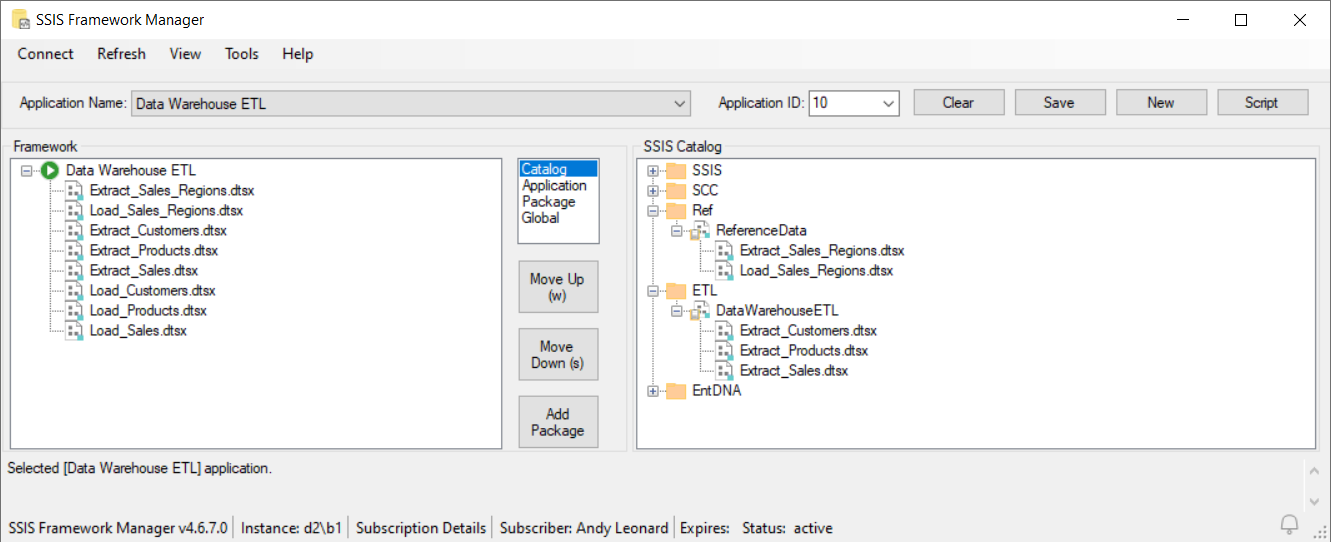
SSIS Framework Manager is the design-time control center for SSIS Framework.
It helps data integration teams define, manage, script, and promote SSIS Framework Applications with more clarity, control, and repeatability.
If your team is running SSIS in the Catalog and needs stronger lifecycle discipline across Development, Test, Pre-Production, and Production, SSIS Framework Manager gives you a practical way to manage application-level orchestration as governed metadata.
What SSIS Framework Manager does
SSIS Framework Manager allows you to build and maintain SSIS Framework Applications by working directly with the metadata that controls execution.
- Create and configure SSIS Framework Applications
- Add packages from the SSIS Catalog to a Framework Application
- Set and adjust package execution order
- Assign package-level environment references
- Configure runtime parameter values
- Define package property overrides
- Script Framework Application metadata for governed promotion
- Generate deployable SFMPAC artifacts for downstream deployment
Build SSIS execution at the application level
SSIS Framework Manager helps you define how packages should run together as an application, not just as isolated package executions.
That matters when your team needs:
- Ordered execution across multiple packages
- Repeatable runtime configuration
- Environment-aware execution behavior
- Restartable, governed operations
- Better promotion discipline between environments
Instead of relying on ad hoc manual setup, teams can manage execution intent as metadata that can be reviewed, scripted, and deployed.
Create and configure Framework Applications
Create a new SSIS Framework Application, add packages from the SSIS Catalog, and organize them into the order required for execution.
This gives your team a structured, visible way to define how an SSIS application should run.
Configure execution order
Set package execution order inside the Framework Application so the application runs the way your process requires.
This supports more disciplined orchestration and makes operational intent easier to understand and maintain.
Assign environment references
Configure the SSIS Catalog reference for each application package.
This gives teams more flexibility when packages within the same application require different runtime context.
Set application package parameters
Configure parameter values to be applied at runtime for each package execution.
SSIS Framework supports multiple executions of the same package within a single application, each with different runtime configuration where needed.
Define property overrides
Create and maintain package property overrides as part of Framework Application metadata.
This helps teams control execution behavior without losing visibility into what was configured and why.
Script Framework metadata for lifecycle management
SSIS Framework Manager was built to support Data Integration Lifecycle Management.
Lifecycle management means promoting governed SSIS artifacts from one environment to the next with more confidence and less manual friction.
With SSIS Framework Manager, you can script Framework Application metadata into T-SQL files for review, versioning, and controlled promotion.
This makes the application definition more portable and gives teams a clearer deployment path across environments.
Generate SFMPAC deployable artifacts
SSIS Framework Manager also generates SFMPAC files.
An SFMPAC packages Framework Application metadata into a deployable enterprise artifact that can be promoted using DILM Deployment Utility.
This is a key part of turning Framework metadata into governed, deployable enterprise assets.
Instead of treating configuration as something that must be rebuilt by hand, teams can package, move, and deploy Framework metadata in a more repeatable way.
How it fits with the rest of DILM Suite
SSIS Framework Manager is part of a broader lifecycle approach for SSIS.

- SSIS Catalog Compare scripts SSIS Catalog artifacts into SCCPAC deployable artifacts
- DILM Deployment Utility deploys supported DILM artifacts, including SFMPAC and SCCPAC files
- SSIS Framework manages application-level orchestration and execution metadata
Together, these tools help teams bring more visibility, repeatability, and control to SSIS lifecycle management.
Who this is for
SSIS Framework Manager is designed for:
- Data integration developers
- Data engineers
- Release management teams
- Technical leaders responsible for SSIS governance and deployment discipline
If your team is tired of fragile handoffs, unclear changes, or manual rework between environments, SSIS Framework Manager helps establish a more governed way to manage SSIS Framework Applications.
Conclusion
SSIS Framework Manager helps teams design, manage, script, and promote SSIS Framework Applications with more operational clarity and lifecycle control.
It is built for organizations that want to run SSIS more like an enterprise application, with governed metadata, deployable artifacts, and a more repeatable path from Development to Production.
Contact us to learn more about SSIS Framework Manager and the rest of DILM Suite.