Name your connections. Stop memorizing your servers.
Download Lifecycle Management Enterprise Tiers
Free download • No signup required • Windows installer
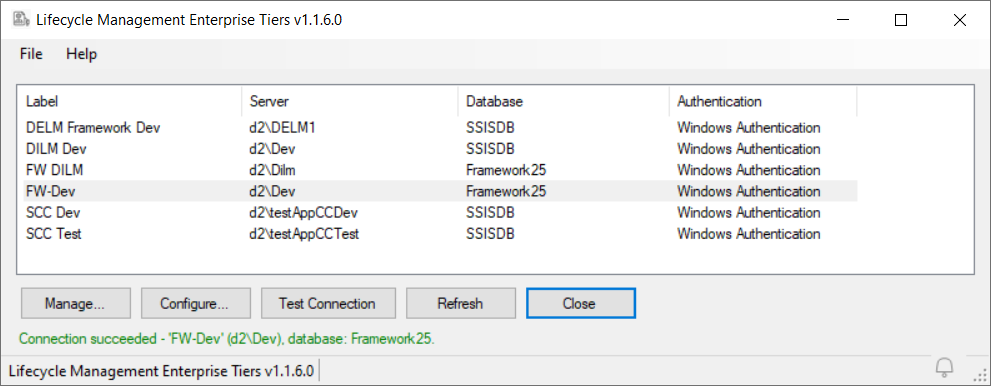
One label. One connection. Every tool.
LM Enterprise Tiers (LMET) manages an enterprise-wide registry of labels – short, descriptive names for your Data Integration Lifecycle Management Suite (DILM Suite) lifecycle management tier database connections, such as “EDW Dev” for the Enterprise Data Warehouse Development database connection and “Sales Prod” for the Sales Production database connection.
Instead of tracking which SQL Server instance and database to connect to, your team connects to a label. Define the connection once. Use the label everywhere.
SSIS Framework Manager, SSIS Catalog Compare, and the DILM Deployment Utility all accept LM labels and use them to connect to the underlying instance and database. When a server moves or an instance is renamed, update the registry once – every tool follows.
Why labels?
Connections describe intent, not infrastructure. “d2\Dev” is an address. “DILM Dev” is a purpose. Labels make the purpose of every connection visible before anyone connects.
Separate function from location. Define the same connection string under different labels for development, deployment, administration, and management. When those functions later move to separate instances, the labels are already in place – the migration is a registry edit, not a re-education.
Promote between tiers by name. Deployments move artifacts between named tiers (Dev, Test, Prod), not between connection strings that differ by four characters. Structurally harder to deploy to the wrong place.
Onboard with vocabulary, not topology. “Connect to EDW Dev” is a first-day instruction. A list of server names is a maintenance burden and a security liability.
Use LM Enterprise Tiers to manage database connections affiliated with:
• SSIS Framework
• SSIS Framework Manager
• SSIS Catalog Compare
LMET manages connections to SSISDB, Framework25, and other lifecycle management databases across your enterprise.
Installation Note (Windows SmartScreen)
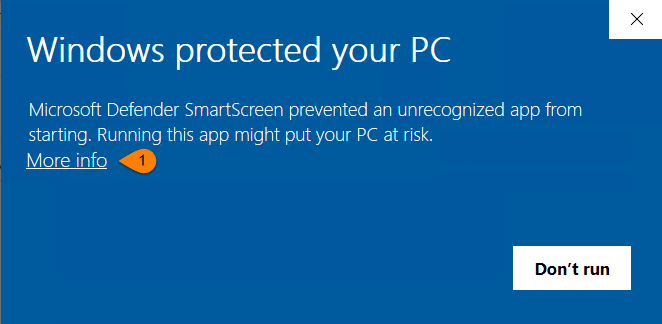
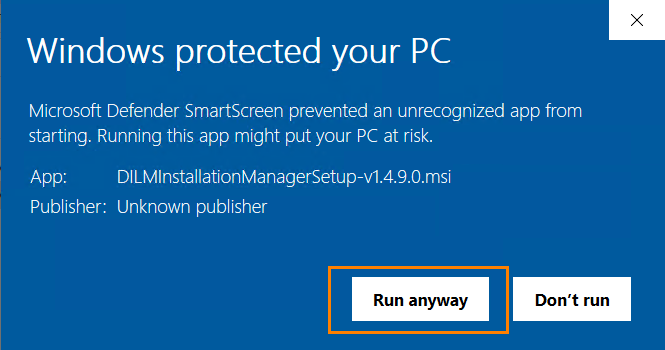
This installer is not yet code-signed, so Windows may show a SmartScreen warning.
If prompted, click More info → Run anyway. Screenshots below.
To verify your download, compare its SHA256 hash against the value published below.
Developed and distributed by Enterprise Data & Analytics (Andy Leonard)